
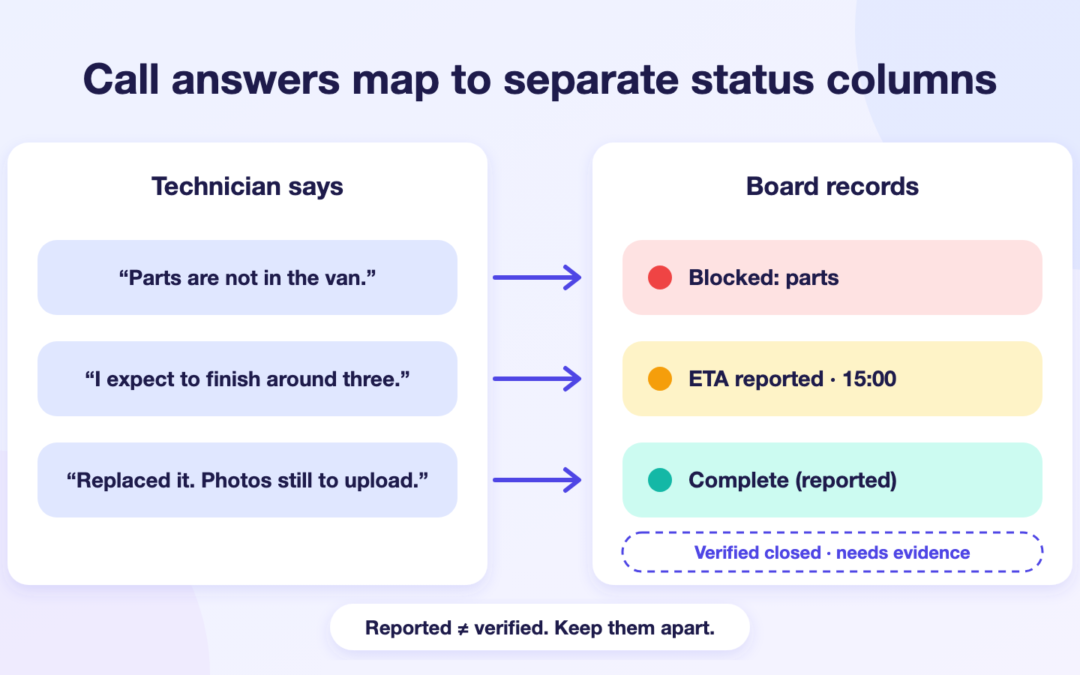
Reliable monday.com field service status updates depend on translating a technician’s spoken answers into a small number of clearly defined fields. A dispatcher needs to know whether the engineer reached the site, what work was done, what is blocking the next step and who should respond. A generic green ‘done’ status will not answer those questions, particularly when a technician’s forecast is mistaken for verified completion.
For service managers using monday.com, the practical design task is to decide in advance which answers are allowed to update which columns. monday.com’s field service management guide describes work orders as shared records of location, skill, parts and expected completion. A status call should add dependable information to that record, not create a competing version of the job.
Separate the job lifecycle from the phone-call outcome
A job can be In progress while a call attempt is No answer. These are different facts. Likewise, the technician can report ‘work complete’ while quality verification, photographs or customer sign-off remain pending. Do not collapse job stage, contact outcome and approval into one column.
An example board might hold: Work-order ID, Service address or site reference, Assigned technician, Planned appointment, Job stage, Reported progress, Blocker category, Estimated next update, Contact outcome, Last response at, Dispatcher action and Verified closure. Access to sensitive address or customer details should follow the company’s normal permission controls.
Define a permitted vocabulary before enabling writes
Unrestricted free-text-to-status conversion can hide uncertainty. Decide which precise inputs justify a status change and which should be saved only as notes pending human review.
| Technician’s answer | Suggested mapped status | What it does not mean |
|---|---|---|
| “I’m on site and starting the inspection.” | On site / starting (reported) | Work verified complete |
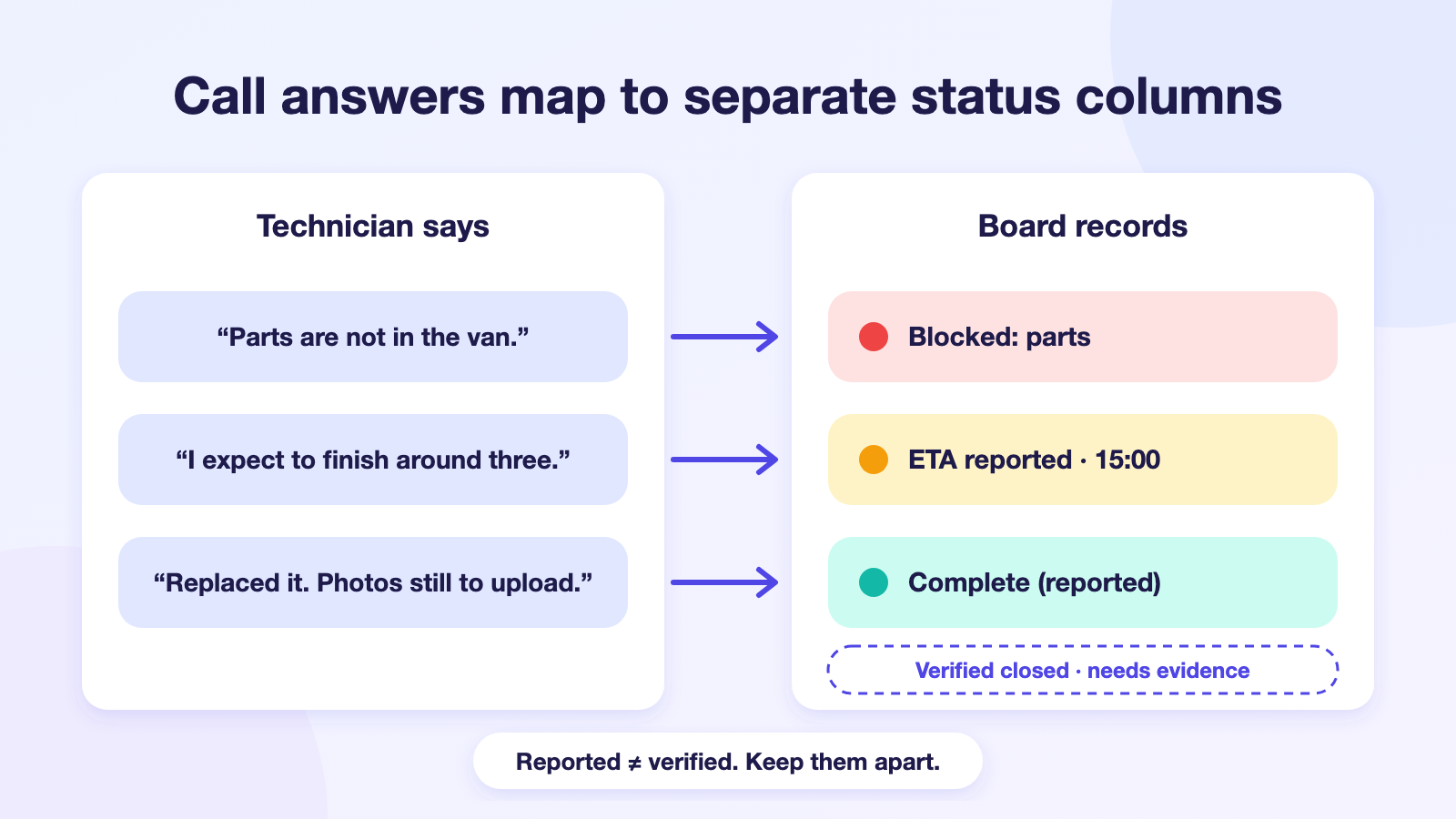
| “The replacement valve is not in the van.” | Blocked: parts | Customer cancellation approved |
| “I expect to finish around three.” | ETA reported; 15:00 estimate | Confirmed finish time or SLA met |
| “I’ve replaced the part; photos still need uploading.” | Work reported complete; evidence outstanding | Job formally closed |
| No answer after a call attempt | Contact outcome: unanswered | Technician absent or unsafe |
These are proposed business rules, not default product mappings. Preserve the technician’s own wording when an interpretation is uncertain, and flag contradictions for review. If the field cannot accept a relevant answer, send it to an exception queue rather than forcing a misleading label.
Ask for evidence, not broad reassurance
A field technician may be driving, working at height, inside an occupied property or completing electrical isolation. Never force a check-in during a safety-critical activity. In an agreed safe window, a useful call begins by confirming the job reference and whether it is a suitable time to speak. Then ask what task or subtask has been completed, what remains, whether parts or access are missing, the next expected step and the time at which another update is useful.
The previous article on capturing job progress from technicians in the field provides a question-led framework. Mapping is the following step: decide where each authorised answer is stored and who reviews it. For example, “the replacement part is installed” can update a reported-progress note, but cannot prove that electrical tests or a customer acceptance check passed.
Build a small mapping specification for the dispatcher
Start with one common job type, such as preventative HVAC maintenance. Draw the state transitions from Scheduled to Assigned, On site, Work in progress, Blocked, Work reported complete, Verified and Closed. Define who may trigger each transition. A status caller may write to ‘Reported progress’ or ‘Blocker’; a supervisor or customer service administrator may own Verified and Closed.
Use subitems for independently assigned activities only when the team needs that granularity. For a plant-room service job, access approval, filter replacement, commissioning test and customer report could be separate subitems. Do not create a complex subitem hierarchy for every trivial motion: over-structuring makes voice questions unwieldy and increases the risk of attaching an answer to the wrong row.
Example: a job with a parts problem and a changing ETA
Imagine a technician scheduled to replace a small component before lunch. At the morning call they report arrival and diagnosis. Midway through the visit, they say the part supplied is incorrect and they expect a compatible replacement after 14:00. A sound mapping retains the diagnosis note, marks the job Blocked: parts, records a reported ETA, and creates a dispatcher action to confirm supply.
If the part later arrives and the technician reports the repair complete, the board should not automatically claim the customer accepted the job. Any test results, photo evidence and handover steps must be handled under the service company’s approved procedure. The value lies in a traceable chain of information, not an optimistic single status.
Implement calls, retries and human exceptions in Autoza
Autoza AI for monday.com publicly describes scheduled start-of-day and status calls, item updates, configurable retry delays, emailed alerts and a call-history dashboard. That supports a controlled phone-to-board workflow. It does not establish that every custom work-order data type is automatically mapped exactly as your business requires.
Before using live customer jobs, test sample board items, write permissions, ambiguous answers, duplicate contact attempts, time-zone handling and failed-call behaviour. Choose which content appears in structured fields versus a notes column; limit broad transcripts to people who genuinely need them. Verify what happens if the same technician has several jobs or if two technicians share a single assignment.
The related guide on missed technician calls and escalation explains why no answer should remain a contact outcome rather than a judgement about a worker. Do not close an item or impose disciplinary action because a phone call was not answered.
Measure information quality, not just call volume
During a two-week pilot, review a sample of board updates against authorised job notes. Measure correct task matching, how often a blocker had an owner, whether estimates were clearly labelled and how often dispatchers had to reverse an incorrect status. Watch for status changes that bypass an established human approval gate.
Make a simple corrections log: original answer, mapped field, corrected value, reason and any adjustment to the questions or allowed responses. Train your dispatchers to challenge the machine-readable label when it conflicts with the job record. If a technician prefers to update the board directly, preserve that path.
Start with one work-order template
Choose a routine, non-sensitive work type, define six or seven useful fields, identify who can approve completion, and test calls at safe agreed times. For help matching your proposed fields to the capabilities you can actually configure, request a product walkthrough and review the field-services industry overview.
Frequently asked questions
Which monday.com columns should a technician call update?
Usually a small approved set covering reported progress, blocker type, next update time, contact outcome and the last response. Keep quality acceptance, customer sign-off and job closure under separately authorised controls.
Can a call update an item and a subitem?
That depends on the actual app configuration and the board structure. Test precisely which selected item or subitem receives each answer before applying the workflow to production jobs.
What if a technician gives an unclear ETA?
Record the estimate as uncertain or awaiting confirmation, retain the original context and assign a follow-up owner. Do not present a tentative forecast as a promised appointment or completed job.
Should no answer change the job status to absent?
No. A missed contact attempt does not establish attendance, safety or progress. Record a separate unanswered-call outcome and follow the dispatcher-approved retry policy.
How do you prevent accidental job closure?
Separate reported work completion from verified closure, restrict who can change the approval field and periodically audit the write rules and sample call results.
Next step: review one real workflow
See how your project questions, permitted board fields and escalation owners could fit a controlled implementation. Explore Autoza AI for monday.com or request a guided workflow review.
Related reading
- How to Capture Job Progress Updates From Technicians Still in the Field
- Missed Technician Calls: When to Retry and When to Escalate
- Automated Morning Technician Check-In Calls: A Guide for Dispatch Teams
- How Many Field-Team Check-In Calls Are Too Many?
- Field services and dispatch industry overview
- Autoza AI for monday.com: scheduled status calls
- Workflow automation services
- Daily Check-in Agent