
Quick answer: A solar O&M site visit checklist should confirm the work order, site contact, equipment location, roof or ground-array access, contractor competence, permit and isolation arrangements, weather limitations, and the evidence required after the visit. The scheduling team can follow up on missing information; only authorised personnel can determine whether electrical work may proceed or a system is safe to return to service.
A commercial solar site can be marked “maintenance due” for weeks while the visit itself remains impossible to execute. The property manager has not approved roof access. Security has an outdated contractor name. The technician knows which inverter needs inspection but not whether a shutdown requires the tenant’s consent. None of those issues calls for another generic reminder saying, “Please confirm attendance.” They require a site-specific readiness record that makes the blocked dependency visible.
This solar O&M site visit checklist focuses on coordinating planned preventive maintenance—not diagnosing faults remotely, instructing anyone how to isolate electrical equipment, or signing off completed work. It applies particularly well to multi-property solar portfolios, where the service provider, asset owner and site occupier are not the same organisation.
Start with the asset and the exact visit scope
Create one work item for each visit and link it to an authoritative asset register. Include the site ID, physical address, array or inverter identifier, service contract, work order reference, intended inspection scope and named technical lead. Do not copy a previous visit’s scope into the next one without checking whether the equipment or work instructions have changed.
Separate planned service from fault response. A scheduled visual inspection, vegetation check or documentation review has different prerequisites from an intervention following an inverter alarm, roof leak or damaged DC cable. Where the reported condition suggests an immediate hazard, route it through the operator’s established emergency and electrical-safety process rather than the routine scheduling queue.
A useful record contains the following fields: site and asset ID; work-order version; service priority; visit window; host contact; access method; contractor approval status; documented prerequisites; required technical permits; planned outage coordination; evidence requested; escalation owner; and final operational acceptance state. These fields should point to controlled documents, not become a public board filled with passwords, wiring diagrams or access codes.
Identify the different people who can say yes
The building owner may approve commercial access, the tenant may agree a disruption window, security may issue a visitor credential, and the service lead may decide whether the team is qualified and prepared. The electrical authorised person may control switching or isolation under a formal procedure. One person saying “all good” is not a substitute for these distinct decisions.
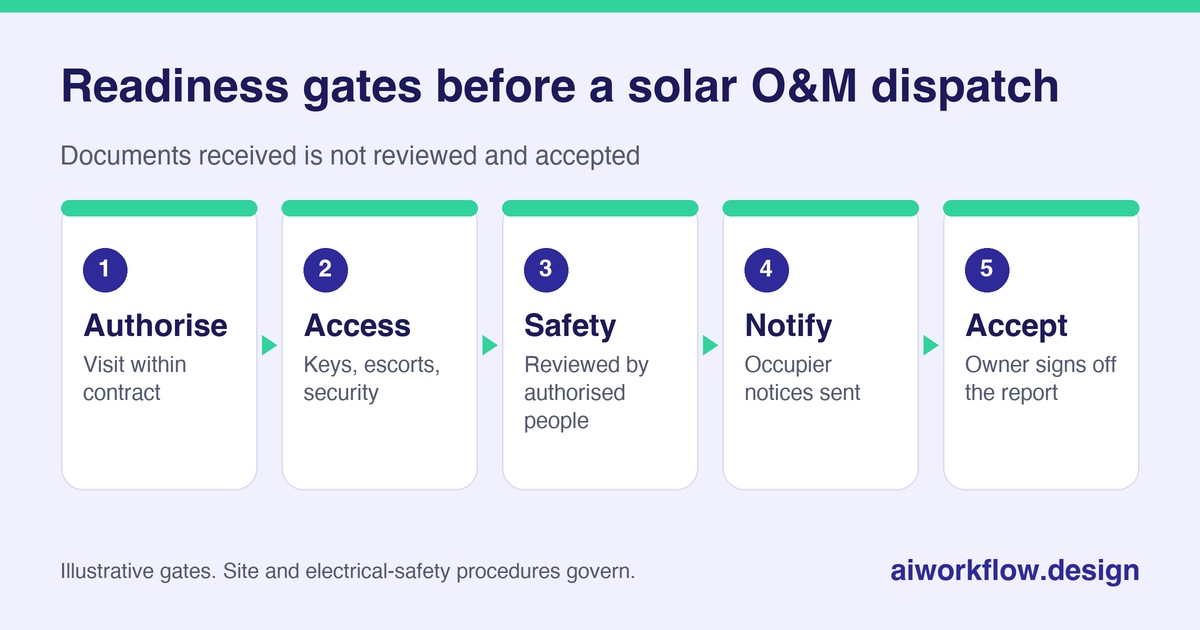
Use four readiness gates:
- Commercial authorisation: the visit is within contract or the extra work is approved.
- Site access: date, escorts, keys, security registration and roof or compound arrangements are confirmed.
- Safety and technical prerequisites: the applicable risk assessment, permissions, competent personnel and any required energy-control arrangements have been reviewed by the appropriate authority.
- Occupier communication: operational interruptions, parking or loading restrictions, and other affected stakeholders have received approved notices.
“Documents received” should be a different status from “reviewed and accepted.” A receptionist or automated caller can ask whether the permit reviewer has responded. It should not interpret the permit, instruct isolation or pronounce an electrical installation safe.
Contractor readiness also depends on qualifications; see solar installer training readiness.
Work backwards from the service window
At the first planning checkpoint, confirm whether the site has special access arrangements: shared roof rights, adjacent trades, security induction, restricted operating hours, bad-weather shutdown rules, fragile surfaces or fall-protection requirements. Solar arrays are electrical installations; OSHA identifies shock and arc-flash hazards in solar work. The technical team must establish controls under the applicable jurisdiction’s rules and the actual site conditions.
At the next checkpoint, request only the outstanding administrative evidence: current contractor authorisation, approved method or risk documents when relevant, a service appointment acknowledgement and any building-owner consent. Keep the document review with the responsible manager. One practical rule is to escalate a missing prerequisite to the owner before travel is confirmed, not when the technician is at the gate.
On the day of the visit, an operational check-in may confirm arrival, access blockage or a revised ETA. It must not become a request for a technician to bypass a locked enclosure, work alone against procedure or reset equipment to satisfy a board deadline. If access is refused, record the refusal and new owner; do not quietly mark the visit done.
Build an approval-aware monday.com board
Use a parent item for the service visit and subitems for site permission, security registration, occupier notice, contractor confirmation, technical readiness review, visit attendance, evidence receipt and closeout acceptance. Give each subitem an owner and due date. Link technical records through controlled document storage where access permissions can be managed.
A small, explicit status vocabulary works better than “Pending / Done”: Not requested, Requested, Received, Review required, Approved by owner, Blocked, and Closed. Approval states should be written only by the named reviewer, not derived from a caller’s spoken “yes.” Keep audit fields for who changed the state and when.
A dashboard can show visits scheduled this week, access dependencies not resolved, tasks waiting on safety review, unsuccessful attendance and evidence outstanding. Count each blocked visit once; duplicate “urgent” flags across subitems can make the queue look larger than reality.
Use automated calls for narrow administrative questions
A daily check-in agent can help collect status from authorised site contacts or service coordinators. A permitted script might ask: “Is Tuesday’s access window still available?”, “Has the building security form been returned?” and “Who owns the missing escort confirmation?” It can log an answer, a callback request or a no-response result. If the caller mentions an unsafe condition, the workflow should surface that response immediately to the designated human contact rather than try to troubleshoot it.
Autoza AI for monday.com is described by AI Workflow Design as supporting start-of-day and status calls that write updates to boards. Its Daily Check-in Agent provides scheduled status updates to other trackers. Neither should be portrayed as an electrical permit system or a substitute for qualified operational review. More specialised routing may require the business’s own approved procedures and a custom integration.
Do not ask a caller to disclose passwords, access codes or other sensitive information. Set a limited retry policy, offer an opt-out or human callback where appropriate, and respect applicable calling and privacy requirements. Unanswered calls become “No response,” never “Approved.”
Document the outcome without confusing attendance with acceptance
After the visit, request a service report reference, equipment IDs, observed faults or restrictions and supporting evidence appropriate to the contract. Store original technical records in a controlled system. Ask a technician to confirm “report submitted,” not “system certified safe” through an automated status prompt. A technically competent reviewer decides whether corrective work is needed, tests are acceptable and the asset can resume normal operation.
Distinguish four closure stages: Visited, Service report received, Technical review complete, and Work order accepted. A technician leaving the site is not the same as the owner accepting performance or closing a warranty issue. If new faults are identified, create a linked corrective action with its own priority rather than overwriting the history of the original preventive visit.
When a visit surfaces a performance problem, continue with the commercial solar underperformance workflow; for vendor change windows see inverter firmware update planning.
Example: an access problem discovered early
A rooftop PV maintenance visit is scheduled for Thursday. On Monday, the coordinator sees the occupier’s access acknowledgement is missing. A status call confirms the contact is on leave and identifies a replacement facilities manager. The coordinator updates the board and requests written authorisation. On Tuesday, the site owner approves the access window; a separate electrical-safety reviewer confirms the required preparations. Only then does dispatch mark the booking ready. On Thursday, the technician attends, submits the report and flags an inverter fault for technical review.
The automation shortened the time spent chasing a name. It did not approve the visit, authorise rooftop work or clear the inverter fault. That separation is what makes the workflow dependable.
Measure coordination quality rather than unsafe speed
Track visits blocked before dispatch, avoidable aborted attendances, time to resolve an access dependency, service reports received within the agreed period, and corrective actions awaiting owner review. These are operational measures, not evidence that the system complies with all electrical or safety standards. Review recurring causes quarterly: missing keys, unclear property contacts, outdated contractor details, or conflicting occupier notices.
A well-run solar O&M programme needs maintenance plans and competent field service. A well-run follow-up programme makes sure the right people have the information to carry those plans out without last-minute surprises. The useful outcome is a documented handoff, not a faster unchecked “Complete” label.
Next step
Want these follow-ups handled consistently? Explore Autoza AI for monday.com or talk to AI Workflow Design about scheduled, permissioned status follow-ups that leave approvals with the right people.
Frequently asked questions
What should a solar maintenance visit checklist include?
It should identify the asset, work scope, approved service window, access permissions, site contacts, contractor readiness, safety-review owner, required evidence and post-visit acceptance process. Local site and contract requirements may add more items.
Can monday.com approve solar electrical isolation?
No. A board can record that the designated authorised person has completed a review. Electrical switching, isolation and safe-work decisions remain under the organisation’s formal technical procedures.
What happens if the building owner does not confirm roof access?
Keep the visit blocked, identify the alternate authorised contact and reschedule if the prerequisite is not resolved. An unanswered reminder is not permission to enter.
Can AI calls chase the service technician for an ETA?
Yes, within a properly configured, consent-aware administrative workflow. The agent should ask for status or blockers, not direct unsafe work or ask the technician to bypass site restrictions.
When is a solar O&M work order really closed?
Only after the required service documentation and technical findings have been reviewed and the designated owner has formally accepted the outcome under the contract and O&M plan.
Related reading
- Commercial Solar Underperformance: Investigate Alerts Before Opening a Warranty Claim
- Solar Installer Training Readiness: Confirm Qualifications Before Mobilisation
- Inverter Firmware Updates: Plan Vendor Windows and Change Records
- PV Monitoring Activation: Confirm Alerts and Owner Access After Installation
- Multi-Site Solar Installs: A Contractor Capacity and Milestone Check-In Plan