

An outdoor event weather contingency checklist should identify the person monitoring conditions, the decision-maker, safe shelter arrangements, and the suppliers who must act when the event plan changes. The checklist is useful only when those people have confirmed their responsibilities before the gates open. A vendor saying “we are ready” cannot establish that a venue is safe, and an automated project update must never be treated as an evacuation or reopening decision.
The practical challenge is coordination. Organisers might have a forecast, but the staging crew has not confirmed how to secure its equipment; the transport provider has a backup route, but nobody has checked its availability; and the public-address operator may be unaware of the exact instruction that the event safety lead intends to use. Scheduled task-owner follow-ups can expose these gaps before an adverse-weather decision is required.
Build the contingency plan around decisions, not weather predictions
Start with a written severe-weather and emergency action plan appropriate for the venue, expected crowd and local requirements. Assign an event director or designated safety lead with clear authority for suspension, sheltering, evacuation and resumption. Identify the authorised person who monitors official forecasts and live conditions, plus a deputy if that person becomes unavailable. National Weather Service guidance recommends that organisers establish lightning-safety arrangements in advance, including places of safety, travel time to shelter and responsibility for monitoring the threat.
Keep the distinction between a forecast and an operational trigger. The project board can record whether the weather monitor has checked the approved sources and whether emergency communications are ready. It should not calculate its own all-clear or substitute a chatbot judgment for the documented safety plan. Trigger thresholds, venue capacity limits and emergency-service coordination need expert review appropriate to the location and event.
Create a task-owner roster that names both the primary contact and the backup
A usable roster goes beyond a phone list. For every weather-sensitive task, record the responsible organisation, named owner, alternate contact, required evidence and decision authority. Use separate rows or subitems for canopy and temporary-structure securing, stage power, exhibitor equipment, transportation, attendee messaging, shelter signage and accessible egress.
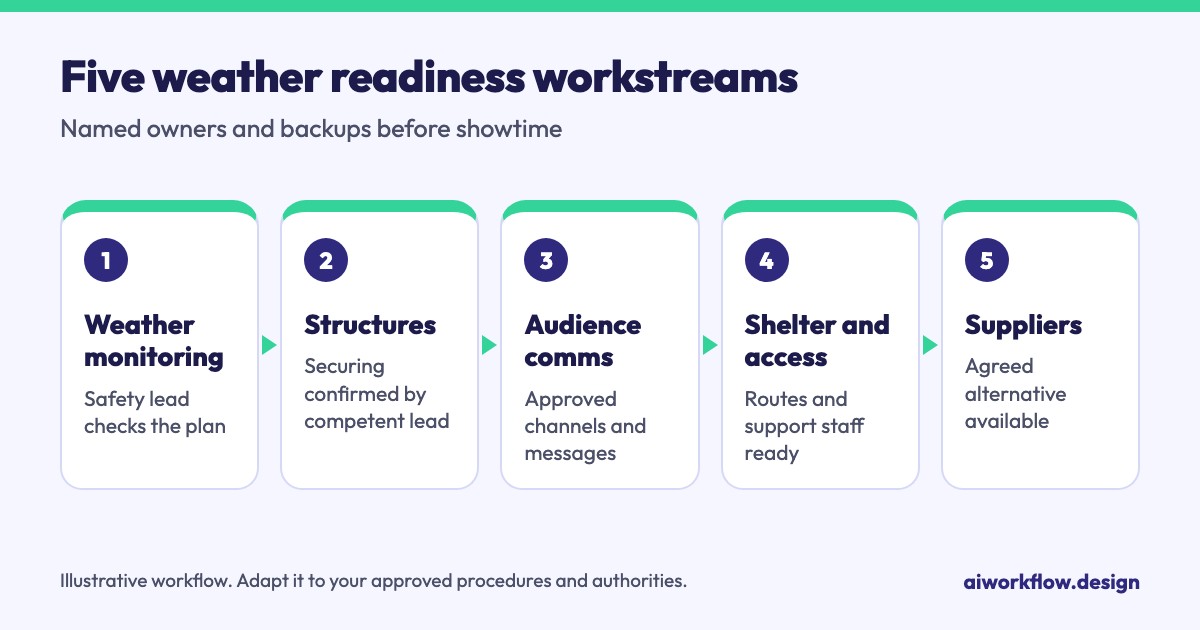
| Contingency workstream | Status question | Human escalation |
|---|---|---|
| Weather monitoring | Have conditions been checked against the approved plan, and by whom? | Safety lead or weather monitor |
| Structures and staging | Is the current securing procedure confirmed by the competent crew? | Technical production manager |
| Audience communications | Are approved announcements and channels ready? | Event director / communications lead |
| Shelter and access | Are designated routes and support staff confirmed? | Venue operations / safety lead |
| Suppliers and transport | Is the agreed alternative resource available? | Logistics manager |
These are suggested planning fields, not claims that Autoza installs a weather-management template. In monday.com, the organiser can maintain a board of owners, due times, dependencies and approved evidence links, then choose which routine status questions belong in a scheduled phone follow-up.
Schedule readiness calls before the event, not during the emergency
Use a staged follow-up cadence that reflects the event’s risk assessment. At an early planning checkpoint, confirm shelter agreements, contingency suppliers and communications ownership. Closer to the event, verify named contacts and response windows. On the final pre-opening check, ask each owner only about the tasks for which a status response will genuinely affect readiness.
For example, a supplier call might ask, “Is the alternative covered equipment location confirmed?”, “Who is your on-site contact if we activate the approved plan?” and “Is any required confirmation still outstanding?” Record a response as confirmed by supplier rather than safety approved. If the answer is uncertain, send the exception to the event logistics manager. The safety lead should use live, direct communication for an urgent incident, not wait for the next automated calling cycle.
A suitable status vocabulary is Not checked, Reported ready, Evidence pending, Human review required and Confirmed by authorised owner. The last value should be restricted to the human role that actually has authority to confirm that element. No-response should mean unverified, not ready or failed.
Separate readiness evidence from decisions to pause or restart
Consider an illustrative outdoor concert with a stage contractor, venue manager, guest transport provider and security firm. The stage contractor reports that its securing team is on standby; the transport provider confirms that accessible vehicles can be reassigned; and the communications lead confirms that the public message has been approved. These statements are useful readiness inputs. None of them individually authorises the event to continue.
The designated decision-maker must decide whether to suspend, shelter, evacuate or resume according to the site plan and applicable official instructions. A board can log the decision, its authority, timestamp and communication owner after a human has made it. If lightning is a concern, official National Weather Service guidance describes a lightning-safety plan with a named monitor, safe shelter and a conservative resumption procedure; use the rule adopted in the venue’s approved plan rather than inventing a universal threshold.
Use monday.com and scheduled AI calls for the administrative layer
An effective workflow separates three layers: the project configuration, the routine follow-up, and the emergency command channel. The monday.com project holds task ownership and evidence references. An authorised administrator configures the approved questions, contacts, timing and mapped status fields. Autoza AI is presented by AI Workflow Design as a way to make scheduled check-in calls, summarise responses and write authorised updates back to monday.com boards. Those public capabilities do not establish that it monitors weather, makes safety decisions or directly controls public warning systems.
You can review the product scope on the Autoza AI for monday.com page. For broader event preparation, the existing article about vendor readiness calls before a major event covers ordinary supplier confirmations; this article focuses specifically on weather-sensitive contingencies and human decision rights.
Review four failure modes before opening gates
Unreachable decision-maker: Define a documented deputy and an alternative live contact method. Conflicting supplier answers: Keep both responses and send them for review; do not collapse them into a green status. Missed check-in: Mark the item unverified and escalate by the approved rule. Unapproved last-minute change: Record the request, pause the affected administrative task and seek a human decision before changing the plan.
Also check that contact lists and phone numbers are current, that any AI-calling disclosure or consent requirements have been reviewed for the jurisdiction, and that emergency numbers do not depend on access to one internet connection. A checklist is not a substitute for an emergency action plan or competent onsite oversight.
A pre-show sign-off checklist worth keeping
Before gates open, confirm that the safety lead and alternate are named, official monitoring responsibility is assigned, shelter and accessible routes are documented, suppliers understand their weather-related instructions, approved messages exist, and unresolved tasks have an owner and deadline. Finish by asking the person with responsibility for the event safety plan to review any open exceptions—not simply to count completed boxes.
For teams already using monday.com, a brief Autoza workflow review can help determine which repetitive vendor readiness calls can be scheduled and which communications must remain human-led.
Frequently asked questions
Who activates a weather contingency at an outdoor event?
The event director or specifically delegated safety authority activates it according to the approved event and venue plans. Supplier confirmations and project-board statuses can inform that person but do not replace the decision.
Can automated calling determine whether an outdoor event is safe?
No. Automated calls may collect readiness responses from assigned people. They do not replace authoritative weather monitoring, site-specific risk assessment, emergency instructions, or a competent decision-maker.
Which backups should be confirmed before an outdoor show?
Confirm accessible shelter and routes, approved audience communications, power and equipment securing procedures, alternative transport or service arrangements, named supplier contacts, and a backup person for every critical owner.
How often should suppliers receive contingency check-in calls?
Use a risk-based schedule tied to planning milestones and the approved calling windows. Reduce duplicate calls when evidence remains current; increase human coordination when conditions change or a safety-related issue is unresolved.
What should a missed check-in mean on the project board?
It means the required information has not been verified. Record the attempt, preserve the latest known response and escalate to the appropriate human owner. Do not infer readiness, absence or safety from silence.
Confirm weather readiness without replacing human decisions
Review scheduled AI check-ins for monday.com for supplier and task-owner confirmations, while weather activation and safety calls stay with named people. See the pricing page or browse more industry workflows.
Related reading
- Multi-City Event Roadshows: A Repeatable Local Vendor Follow-Up Plan
- How to Run Vendor Readiness Calls Before a Major Event
- Event Rehearsal Follow-Up: Calls, Task Owners and Exception Rules
- AV and Stage Setup Check-Ins: What an Event Producer Should Ask
- Speaker Materials Running Late? A Follow-Up Workflow for Event Teams