
Quick answer: How dispatch teams can confirm planned maintenance visits with the right contractor, site owner and preventive task pack before the service window.

Field service preventive maintenance scheduling is easiest to manage when the work is repeatable, but “routine” should not mean that appointments go unchecked. A contractor may be booked months in advance while the site contact, equipment condition, building access rules or required consumables change. If those changes reach dispatch only when a technician arrives, a predictable service visit becomes a costly interruption.
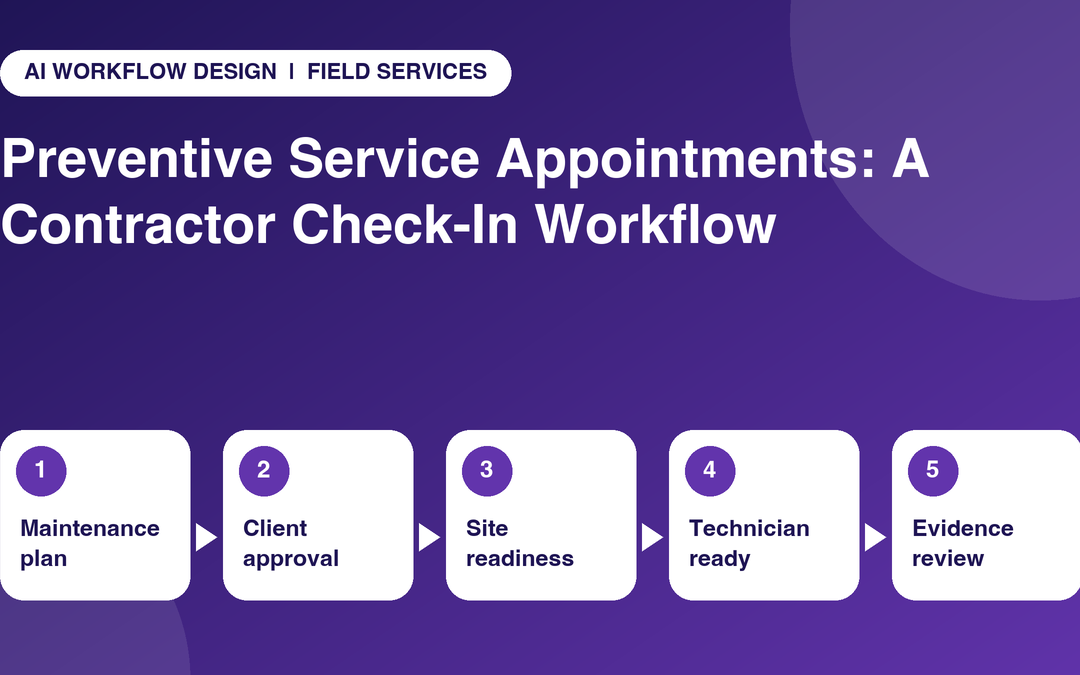
An effective contractor check-in workflow confirms the right asset, access window, required task list and service provider before dispatch. The approach is different from start-of-day attendance calls: the objective is readiness for a particular planned job, not constant monitoring of a person’s whereabouts.
Work from the maintenance plan and asset history
Begin with the approved preventive maintenance schedule for each asset or facility. Record the service interval, task scope, last completion evidence, special access arrangements and applicable manufacturer or safety requirements. A calendar appointment without a linked asset record makes it hard to determine whether the technician has the right kit or whether other work is due at the same site.
ServiceTitan recommends maintenance-specific forms and checklists so routine visits capture the required information. A 2026 preventive maintenance checklist from TrueContext similarly emphasises tools, spare parts and access to service history before dispatch. Use these as operational examples, not as a substitute for manufacturer procedures or the client’s contractual maintenance obligations.
Plan three confirmations, each with a separate owner
The first is service authorisation: the client or asset owner has approved the scope and any required interruption. The second is site readiness: the facilities contact confirms access windows, escorts, equipment location, production restrictions and other prerequisites. The third is technician readiness: the contractor confirms training, permits, tools, parts and sufficient time for the assigned preventive tasks.
Dispatch or the service coordinator reconciles the three streams. If the building contact says the plant room will be locked or production cannot stop, the visit is not simply “confirmed” because the contractor answers yes. A human must resolve the access and operational conflict.
Time check-ins to milestones instead of calling every day
For recurring service work, one confirmation when the visit is assigned and a short pre-visit readiness check near the actual window may be enough. Increase contact only when there is a changed site condition, an unconfirmed permit or a supplier-dependent task. The exact cadence depends on contractual notice periods, site working hours and the organisation’s consent and calling policies.
Ask specific questions: “Can you attend the agreed two-hour access window?” “Have the filters and calibration equipment been allocated?” “Has the shutdown owner confirmed the permit?” “Did anything change since the previous service?” Avoid vague “all good?” prompts and do not interpret silence as a refusal. The related article on field-team check-in frequency explores why every call needs an operational purpose.
Give the technician a complete preventive work pack
The pack should contain the asset identifier, task checklist, safety procedures, permit status, service history, site map, access contact, allocated consumables and documentation requirements. Commercial customers may also need an agreed outage window. If several assets share a location, sequence the work so one permit or escort does not create repeated delays.
After arrival, the worker follows the authorised method and documents readings or findings in the appropriate service tool. The check-in call is not the place to recite calibration results in full or send confidential building information. If an unusual defect is discovered, the technician raises a new issue for human triage rather than allowing a routine status label to hide it.
Design board columns that respect the difference between visit and work
An illustrative monday.com board can contain Site, Asset, Service interval, Visit date, Contractor, Job pack issued, Access confirmed, Materials ready, Permit status, Visit reported, Evidence received, Reviewer and Next due date. Keep a separate completion-verification field: an end-of-visit call may report that the technician attended but cannot prove every checklist item was completed correctly.
monday.com project boards support ownership and timelines. AI Workflow Design products describe scheduled check-in options that may be useful to gather contractor responses. Confirm integrations, permissible status mappings and retention settings for your specific workflow before relying on automated updates.
Escalate missed appointments and abnormal findings differently
An unanswered call about a routine inspection might merit an approved retry or dispatcher review. A report of unsafe equipment, a failed safety test or a service activity beyond the technician’s authority requires the organisation’s documented technical and emergency procedures. The calling assistant must not classify equipment safe to operate or instruct a contractor to bypass a permit.
If a service appointment cannot occur, the planner should document the reason and coordinate a new date with the asset owner. A rescheduling decision might affect compliance, warranty or service-level commitments; those effects require the responsible manager’s review.
An illustrative planned service cycle
Consider a quarterly inspection for a commercial ventilation system. The maintenance plan shows the asset due this month, but the facilities manager has changed access rules and the contractor expects a filter delivery. The coordinator checks the customer-approved scope, contacts facilities about the new gate and escort process and asks the contractor to verify filter allocation before confirming the visit. A reminder sent without those details would be premature.
After the service, the technician uploads the checklist and readings through the approved work-order channel. A short status call can report that the visit occurred and identify any follow-on defect; it does not automatically create a clean safety inspection certificate. The designated reviewer records evidence acceptance and the next service due date. This separation protects both the client and service provider.
Measure more than on-time technician arrival
Track percentage of maintenance visits with the correct job pack before dispatch, first scheduled access success, missing-material cancellations, visit documentation completion and overdue preventive tasks. Appointment punctuality matters, but it says little about whether the maintenance work is recorded and reviewed.
Pilot the process with a limited asset class and compare the quality of readiness information before and after. The goal is a reliable service cycle in which the coordinator can see the next due task, the current evidence and any issue needing a human decision.
Practical checklist: steps to put into the next workflow review
- Link each appointment to asset, interval and last service record.
- Check client approval, permits and downtime constraints.
- Confirm site access, escorts and responsible contact.
- Verify technician suitability, tools and consumables.
- Send the authorised preventive maintenance task pack.
- Track evidence review separately from attendance.
- Rebook exceptions through the responsible dispatcher.
Illustrative status-to-decision mapping
The following is a proposed workflow example, not a default configuration or an authorisation to make operational decisions automatically.
| Checkpoint | Person to ask | Reported evidence | Human decision |
|---|---|---|---|
| Access window | Facilities contact | Confirmed entry and escort | Dispatcher reschedules if blocked |
| Service materials | Assigned contractor | Parts and equipment allocated | Service lead resolves gaps |
| Maintenance evidence | Technician/reviewer | Checklist and readings available | Authorised reviewer accepts |
Where scheduled AI check-ins may help
For approved monday.com tasks, structured calls can capture relevant progress and flag unresolved actions for a project manager. The Autoza and AI agent overview describes scheduled status calls, board updates and summaries. Set scripts, call windows, consent and disclosure, permitted update fields, retries and human escalation with the implementation owner before a live rollout. Keep original documents and final authorisations in the relevant system of record.
If a call is unanswered, record “no response” rather than inferring non-attendance, rejection or completion. Do not let a generated summary substitute for an official permit, signed creative proof, technical test, warranty decision or customer agreement. For mobile teams, a suitable non-call update channel should remain available when someone is driving or working in unsafe conditions.
Next step: review one real workflow
Choose a real but non-sensitive project, identify the follow-up questions that currently delay a decision, and review them with the people who own the task and the approval. Explore AI Workflow Design’s products or browse its existing automation articles to see how scheduled calls can complement current systems without replacing experienced event and service operations teams.
Frequently asked questions
When should planned preventive service visits be reconfirmed?
Confirm at assignment and again when the visit approaches or material conditions change. Use the client agreement, access rules and task risk to set the actual schedule.
What should a preventive maintenance appointment reminder include?
Identify the site, asset, planned window, task scope, access requirements, contact point and any required safety or permit prerequisites, without exposing unnecessary confidential data.
Who can mark preventive maintenance work complete?
The technician can report the work performed, but final acceptance and any regulated sign-off must follow the company’s authorised review and documentation process.
Can an AI caller replace a preventive maintenance checklist?
No. It may collect readiness or progress status, but technical measurements, photos, signatures and test evidence should be recorded in the appropriate approved system.
How do we avoid too many contractor calls?
Tie calls to unresolved decisions or important milestones, respect agreed windows and stop calling once a reliable update is already available.
Related reading
- How Many Field-Team Check-In Calls Are Too Many?
- Automated Morning Technician Check-In Calls: A Guide for Dispatch Teams
- Mapping Technician Call Answers to monday.com Job Status Columns
- Second-Visit Jobs: Confirm Parts and Access Before Dispatching a Technician
- Warranty Service Follow-Up: Record the Right Evidence Before Closing a Job