

Quick answer: A practical ownership and verification plan for event load-in: who confirms gate access, dock slots, contractor credentials, technical readiness and the final handover.
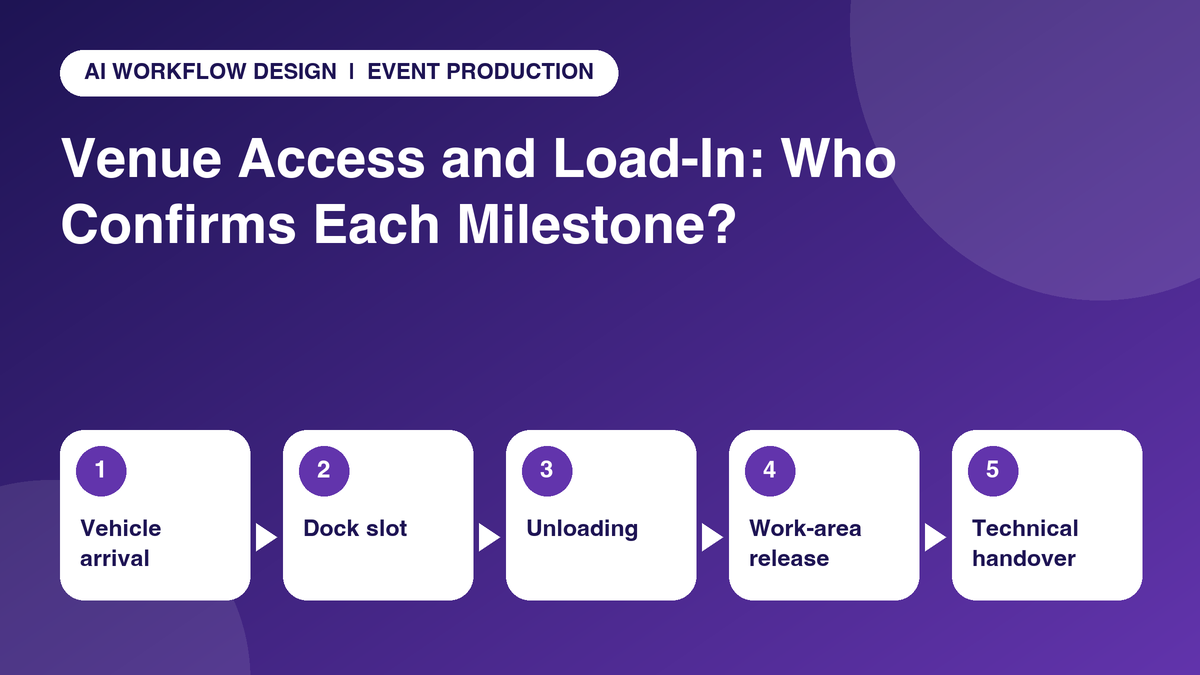
An event load in coordination checklist is more than a list of arrival times. When a production truck reaches the wrong gate, a rigging crew lacks the correct credentials or the loading dock is shared by several suppliers, the disruption travels quickly to lighting, staging and rehearsal milestones. The schedule succeeds only when venue access, supplier commitments and authorised permissions agree.
The key is to give each milestone two roles: the person who reports readiness and the person who can validate or authorise it. A concise follow-up call can collect an update from a driver or contractor, but venue security, dock control and safety teams must retain control of entry and work permissions.
Establish the source of truth for venue access
Begin with the venue agreement, the organiser’s logistics pack and the most current approved loading plan. They determine permitted entry points, vehicle dimensions, lift availability, restrictions on material handling, working hours and which contractor controls each service. Do not build the operational plan from a previous year’s run sheet or a supplier’s informal estimate.
The DHE Ireland exhibitor manual, for example, describes controlled loading-bay access, vehicle passes, marshals and required protective equipment for build-up. It illustrates how access rules extend beyond knowing the postcode. Keep source-document links and version notes on the production board so everyone can identify the rule behind a task.
Create a gate-to-work-area chain of confirmations
Break the journey into distinct gates: authorised vehicle arrival, loading bay allocation, unloading permission, material transfer, contractor entry, work-area release and technical handover. One supplier may complete unloading while another is waiting for a lift or an approved rigging zone. A single item marked “arrived” gives the production manager too little information.
For each gate, designate a reporting owner, the venue or appointed service contact who confirms it, and the next dependent activity. If a staging component is not released into the work area, the lighting team should see a blocker before it mobilises unnecessarily. Record the last verified event, not an optimistic prediction.
Build a responsibility matrix that survives staff changes
A compact matrix should show the producer, venue operations contact, dock marshal, security manager, freight handler, technical department lead and each contractor. Distinguish who is responsible for reporting, who is accountable for approving and who must be informed. Where the venue owns a decision, internal production staff should not label themselves the approving authority.
Keep a backup contact for shift changes, but avoid giving every supplier a long call list. One supplier should have a single operational escalation point. If a truck is stuck outside, the driver reports the details, the loading coordinator checks availability and the authorised venue marshal directs the vehicle. The producer tracks consequence for the critical path.
Choose check-ins around changing risks
Use a confirmation before contractors dispatch, another if travel or dock conditions materially change, and a final checkpoint before the work-area handover. A morning blanket call to every worker is less useful than reaching the specialist whose arrival determines whether a subsequent crew can start. Some tasks need only portal confirmation; others need a rapid human conversation.
Sample questions include: “Which gate and vehicle registration are on your current pass?” “Has the marshal confirmed your time slot?” “Are your staff inductions approved?” “What equipment is still unavailable?” “Which downstream team should not mobilise yet?” The aim is an answer that changes a decision, not a generic reassurance that everything is fine.
Use an exception-first board with evidence fields
An illustrative project board can include Milestone, Location or gate, Supplier, Slot start/end, Venue owner, Contractor owner, Reported arrival, Access confirmed, Permit or evidence link, Dependency and Exception severity. A red flag might mean “requires venue decision”, not “supplier at fault”. Record whether a response came by a call, authorised email or dock system.
monday.com project boards can organise dependencies and responsibility. The scheduled status-calling capabilities described in AI Workflow Design products may be useful for approved supplier follow-ups, provided the organiser tests the exact script, calling permissions and mapped fields. Do not infer that the AI can change security or dock-control systems.
When the plan slips, protect safety and the critical path
If a supplier misses its slot, log the revised ETA as reported and send the request to the venue controller; a replacement slot is not confirmed until that controller grants it. If someone arrives without a badge, security applies the official procedure. If a work-area hazard is reported, stop relying on routine automated contact and follow the event’s designated emergency and safety response.
Use the run-of-show and build schedule as downstream context. Tell affected teams what is held, what evidence will release the hold, and who owns the decision. Avoid prematurely telling technicians that the site is “safe” merely because the contractor reports the equipment is on site.
A worked example: the late arriving lighting truck
Imagine a theatre production in which lighting equipment is planned for an early loading window and the stage contractor is booked to start immediately afterward. The transport lead reports a traffic delay, but no replacement dock slot has been authorised. The event producer records “arrival forecast changed”, links the lighting work to the loading milestone and asks the venue marshal about a lawful alternative. The stage lead is informed that its dependent work may shift, without instructing either crew to enter an unsafe or unapproved area.
The useful outcome is not the number of people called. It is a confirmed new access decision or a named unresolved issue with a realistic review time. Preserve the original slot, revised reported ETA, authorised decision and affected rehearsal activities for a post-event lesson. This worked example is illustrative; each venue controls its own safe methods and access rules.
Review the process after the last contractor leaves
Track supplier arrival variance against booked slots, number of unresolved access exceptions at each handover, proportion of contractors with complete credentials and the time required for venue approvals. Do not treat the number of calls as the outcome; calls are useful when they eliminate ambiguity or direct the right manager to intervene.
After the event, update the access matrix and contacts against the actual venue constraints. The goal is a reusable confirmation pattern that respects each venue’s distinct rules, not a single universal load-in timetable.
Practical checklist: steps to put into the next workflow review
- Store the current venue access plan and contact matrix.
- Verify vehicle, gate, marshal, arrival and departure windows.
- Confirm crew induction, badge, insurance or permits as applicable.
- Separate dock arrival, unloading and work-area delivery milestones.
- Flag stage, lighting, AV and rigging dependencies before mobilisation.
- Record confirmed permissions separately from reported readiness.
- Use venue-authorised escalation for changes to access or safety controls.
Illustrative status-to-decision mapping
The following is a proposed workflow example, not a default configuration or an authorisation to make operational decisions automatically.
| Checkpoint | Person to ask | Reported evidence | Human decision |
|---|---|---|---|
| Dock arrival | Transport lead | Reported ETA, vehicle and gate | Marshal authorises slot |
| Work-area release | Venue operations lead | Area availability and restrictions | Venue signs off release |
| Technical handover | Relevant technical lead | Installed/test-ready status | Authorised technical lead approves |
Where scheduled AI check-ins may help
For approved monday.com tasks, structured calls can capture relevant progress and flag unresolved actions for a project manager. The Autoza and AI agent overview describes scheduled status calls, board updates and summaries. Set scripts, call windows, consent and disclosure, permitted update fields, retries and human escalation with the implementation owner before a live rollout. Keep original documents and final authorisations in the relevant system of record.
If a call is unanswered, record “no response” rather than inferring non-attendance, rejection or completion. Do not let a generated summary substitute for an official permit, signed creative proof, technical test, warranty decision or customer agreement. For mobile teams, a suitable non-call update channel should remain available when someone is driving or working in unsafe conditions.
Next step: review one real workflow
Choose a real but non-sensitive project, identify the follow-up questions that currently delay a decision, and review them with the people who own the task and the approval. Explore AI Workflow Design’s products or browse its existing automation articles to see how scheduled calls can complement current systems without replacing experienced event and service operations teams.
Frequently asked questions
When should venue access details be reconfirmed?
Reconfirm before contractor dispatch and whenever the venue issues a revision or an important arrival condition changes. Use the venue’s own cutoffs rather than a universal number of hours.
Who issues loading and access permissions?
The venue, organiser or its appointed authorised logistics and security teams control access according to their rules. Contractors report readiness but cannot grant themselves entry.
What belongs in an event load-in run sheet?
Include vehicle slots, gates, contractor contacts, work-area handovers, authorised permissions, technical dependencies, contingency owners and a link to the current venue plan.
Can an automated caller reschedule a truck at the dock?
It can gather the revised ETA and alert the relevant person. A new slot is only confirmed when the person or system authorised by the venue approves it.
How do producers avoid duplicate supplier calls?
Keep one named owner per decision, use existing verified updates before calling and restrict further calls to unresolved milestones or changed conditions.
Related reading
- Building a Run-of-Show Follow-Up Schedule Across Multiple Vendors
- Event Rehearsal Follow-Up: Calls, Task Owners and Exception Rules
- Speaker Materials Running Late? A Follow-Up Workflow for Event Teams
- Exhibitor Move-In Deadlines: A Pre-Show Follow-Up Checklist
- Sponsor Artwork Deadlines: Follow Up on Event Branding Deliverables